

Feature Blog
230+ Feature Updates

November 1, 2024
New! Alternate System Profile Templates
System Profile Templates have been expanded with new alternate options which allow for more flexibility in pre-defining permissions. You can now specify up to 5 alternate profile options for each system within the template. These alternate options can be used for variations of the standard profile. Once alternate system options are defined you can now create up to 255 different combinations of standard and alternate profile options. When creating or modifying a user system code, these alternate combinations can be chosen from the list of template options. Previously this would have required multiple templates to accomplish the same permission definition across ...
Read MoreOctober 16, 2024
Recent Usability Improvements
Customer Management Portal Hikvision NVR PTZ Control: Now PTZ cameras connected to a Hikvision NVR can be controlled via Connect ONE when viewing live video. Controls include pan, tilt, zoom, and preset control. Speco Blue NVR Integration: A new integration is available for Speco Blue Series NVRs to retrieve the camera listing, video verification to events, and live viewing. Live viewing requires the Image Proxy Service enabled. Dealer Administrative Portal & System Updates Share Option for Reports & Interaction Rules: The share option can be updated via the Dealer Portal for customer reports and interaction rules. This allows you to override ...
Read More
September 5, 2024
New Report Options & Recent Usability Improvements
All activity related reports now have a new convenient timeframe option called "Overnight" which will depict activity from 7am the previous day to 7am of the current day. This timeframe is perfect for employee shifts which extend beyond midnight. The In/Out report has two new template options, Violation Summary & Detail. Recently the In/Out report was expanded to include entry of a violation time in an area, meaning when an employee spends too much time in one particular area of the facility. Now these new templates can filter the activity throughout the day to show only violation entries. ...
Read More
August 5, 2024
Custom Function Activation on Bosch Panels
Custom Functions allow you to customize the operation of a system by performing a list of commands with just one action or one button. Now these custom functions can be received into Connect ONE and may be activated from Tasks in the Application. Activations can be initiated instantly, with a delay, on a schedule or upon a received event via Task Rules. A use case for custom functions came about to handle snow days at a facility, the custom function can be used to disable access for certain authority levels and another to re-enable access. These custom functions can ...
Read MoreAugust 5, 2024
Recent Usability Improvements -- August 2024
Customer Management Portal Time Rule - Area Time Limit: A new time check condition has been added to notify upon a user spending more time than permitted in a defined area of the facility. One example use is to monitor when employees are spending too much time in a break room. Event Rule - User Last Area Condition: Another condition statement has been added to only match the incoming event when the applicable user was in or not in a matching area. Task Rule - Webhook Trigger: A new action option for a webhook trigger has been added. Webhook ...
Read More
July 8, 2024
Cansec MAP Access Controller Integration
A new integration with Cansec MAP access controllers is now available. A direct cloud integration with the MAP controllers allow for easy outbound-only communication and does not require any additional hardware onsite. Optionally the integration can be added to the Connect ONE Access Expander which allows integration with Elk, DMP, Bosch, and Honeywell intrusion panels as well as ScanPass Mobile Credentials and Aperio wireless access locks. The direct cloud integration includes: Networked Door Controllers in 1,2,4,or 8 door configurations Outbound-Only Network Communication No Intrusion Panel necessary but may be integrated via Task Rules to toggle Secure/Lockout mode on readers ...
Read More
May 10, 2024
Emergency Response Platform for First Responders
We're excited to introduce an all new emergency response platform designed for first responders. The platform is built-into the Connect ONE Dealer Application. Agencies such as police department personnel may be added as users of the platform. An agency login is different than a typical dealer login, when an agency logs into the application they will only see customer site locations they have been shared access to by the dealer, the shared access will only allow certain designated permissions. Those permissions are whether they can login to the customer site/app, activate the emergency dashboard, and/or add/modify ...
Read More
May 1, 2024
Monitor->Options Dashboard Views
The Options button on any Monitor screen now allows the requested option to open in a quick dashboard view rather than redirecting the user off of their current screen. For instance, if they are viewing Security they can quickly pull up Activity to see an event quickly and then close the Activity view and remain on the Security page. This feature also works for viewing Cameras and Automation screens as well.
Read More
February 1, 2024
New DMP Persistent Connection Method - No Inbound Ports & Fast Command Processing!
The DMP XR & XF Series control panels may now be programmed with a persistent connection option. Once programmed, the control panel makes an outbound connection to the Connect ONE cloud and the connection is held open. Since this is an outbound direction, no incoming ports need to be open on the customer's firewall, and since the connection is held, commands are sent back in near real-time for processing on the panel. It is the best of all worlds, no open ports and fast command processing! Please refer to the Configuration tab for the Device on the Connect ONE Dealer ...
Read More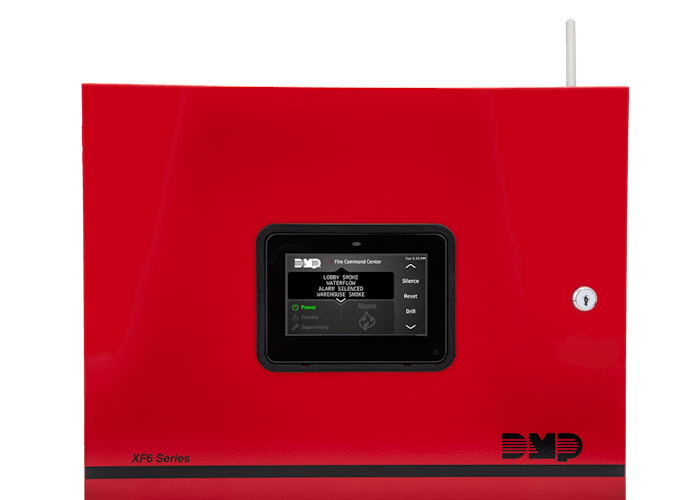
February 1, 2024
New DMP XF6 Fire Panels Are Now Supported!
The DMP XF6 is a state-of-the-art 24V fire control panel which is both addressable and UL864 Listed for wireless. Full control and user programming capabilities are now supported within Connect ONE. Programming is similar to the XR series panels, refer to the Configuration tab for the Device on the Connect ONE Dealer Application Portal for programming instructions.
Read More
January 10, 2024
New Multi-Sensors Supported for Temperature, Humidity, & Carbon Dioxide!
The Network Gateway accepts up to 6 combination carbon dioxide/temperature/humidity sensors (all 6 connected sensors must be of the same type ex) all G01, HUM, or CO2 - see sensors below), and the same gateway can also accept multiple 1-wire temperature probes plus a fire alarm panel printer connection, at the same time. The multi-sensors use simple daisy-chain wiring on cat5e (100m – 200m total length). No calibration necessary and readings will not vary based on wire distance since the sensors report the reading via data transmission rather than by resistive changes. There may be onsite annunciation of Alarms & ...
Read More
November 1, 2023
New Visitor Management Features and Capabilities
Connect ONE Visitor Management provides tracking of visitors and guests and integration with access control systems plus Safe Passage for self-approval of health, training, and/or legal waivers. Many of these new features can also apply with integration of external visitor management services via our webhook/api methods (webhook description in a separate section below). Once a user profile is designated as a Visitor, any users assigned to the profile are now recognized as visitors for filtering capabilities in reports and lists, and new actions exist for assigning a visitor to a host and applying check-in and check-out dates ...
Read MoreShowing 25-36 of 230 features