
Feature Blog
230+ Feature Updates
March 3, 2014
SmartTest Expanded, New Temperature Logging Intervals, & More
Alarm Silence and Sensor Reset buttons added to SmartTest. Now when testing alarm zones the bell can be silenced quickly and the sensor reset can be accessed when testing fire zones. Maximum session expiration setting added to Login Profile. Now the customer can limit a user to only certain expiration settings. For instance, they may want to restrict a guard so they only stay logged in for 90 minutes and do not allow the Stay Logged In option. This ensures that if they forget to logout after their shift, they won't remain logged in forever. Also, the customer does have ...
Read More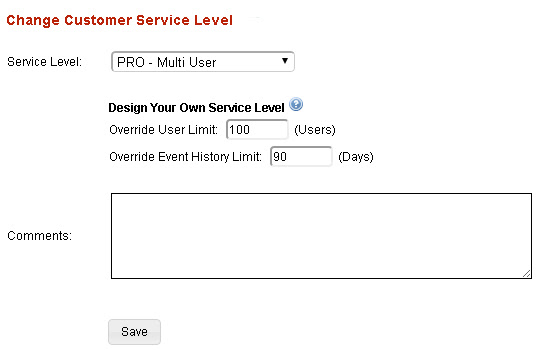
February 14, 2014
Design Your own Service Levels
Now you can design and build your own service levels by setting an override on the customer service level. You can take our PRO version and break it up into multiple levels. For example you can have a standard PRO level of 100 users and 90 days of event history. Then build additional service levels to expand the user count and event history. This will increase your RMR and profit margin as the needs of that customer grow. Regardless of how you use the overrides your cost will not change.
Read More
January 30, 2014
Append a Custom Message to Any Email Notification
Now your customer can add their own custom message to any email notification. The use could be a general note or message, or possibly a list of instructions listing the proper action to take. Each person notified can have their own message. Notification Edit Screenshot Example of Email Notification: (Custom Message appears after the timestamp) Subject: Event from Office Building Alarm: Supervisory Zone:5 Water Alarm 1-28-14 10:25 AM Call the plumber, 800-555-1212 Example of Email Notification: (Custom Message appears after the user) Subject: Event from Hospital Command: System Lockdown Command [ ER Panel @ Hospital ] 1-28-14 10:25 AM ...
Read More
January 27, 2014
Unified Customer Login for both Desktop and Mobile Applications
Now your customer can use the same login screen to take them to either the desktop or the mobile application. The default action for smart phones and tablets will be the mobile site but the customer can override this setting using the dropdown box. Remember you can build the customer login into your website so you can continually promote your products and services. Please contact us to get the updated html code to use on your website.
Read More
January 14, 2014
Central Station Operator & Support Staff Permissions
Now you can set a login to the dealer site to view only permissions and still allow access to the customer site via the "login as dealer" option. This is great for central station operators or customer support staff that only require access to the customer site to make a quick user change or run a report but don't require any dealer site configuration changes. Users with view only access will be allowed to login to the customer site but they will be required to input a mandatory message about who requested they login and why. This message is ...
Read More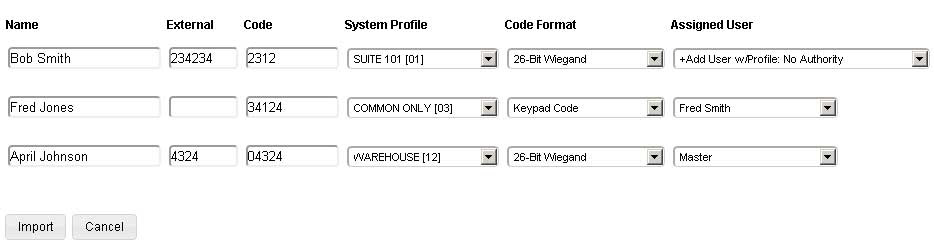
January 13, 2014
Import Utility & System Status Screen
Code Import Utility Now you can easily add new codes. update existing, copy panels, all from one import list. Simply create a comma separated list (csv) from excel and upload it on the dealer site. You only need to upload the code name, external number (optional), and code digits. Once uploaded you can apply whichever profiles you want and Connect ONE will either create a new user or match the code to an existing user. Everything is done in one simple step. System Status at a Glance Now your customers can go to one ...
Read More
May 20, 2013
New Energy Management & Lock Control utilizing DMP Z-Wave
DMP Z-Wave Status & Control Available on both Connect ONE LIMITED and PRO Security Management Z-Wave Locks View Status including Battery Level & Control Energy Management Z-Wave Thermostats View Status including current operation state, i.e. if the furnace or a/c is running & Control *Automatic or Timed set to Energy Conservation Mode based upon current arming mode *Automatic Sync of Date/Time once per day *Customer Controllable Display Lock Setting (Trane/RCS Z-Wave Thermostats) * Connect ONE Exclusive Feature Z-Wave Lighting View Status & Control including Dimmer Control Task Management Activate Predefined Z-Wave Favorites - A favorite ...
Read MoreApril 2, 2013
DMP XR150/350/550 Panels Now Supported
We're pleased to announce that the new DMP XR150/350/550 panels are now fully supported. These new panels have many exciting new features, including: Improved 10/100 network connection, previously only 10 megabit Up to 4 profiles per code Up to 8 schedules per profile Easy reuse of Time Schedules for Areas, Doors, Outputs, and Profiles We've also added a new feature for all DMP systems. Now Connect ONE will update the time and date of any model DMP panel once per day. Previously only the receiver programmed as path 1 in the control panel was used to update the time. This was primarily the panel's ...
Read More
January 7, 2013
Quick & Easy Technician Testing
SmartTestTM is an easy new way for technicians to test and control system points, (zones, doors, areas, & outputs), on their smart phone. How many times have you been working on a zone at a far point of the building, on a lift, at a splice in the attic, etc. and wished you had someone at the keypad relaying the status. Now you can have that convenience without needing a second tech. Just use the newSmartTestTM feature from your smartphone and watch the status of the zones ...
Read More
January 7, 2013
Send Lockdown to Multiple Systems from PC or Mobile
In response to a feature request from a customer with multiple buildings on their campus, your customer can now perform a lockdown to multiple systems from a single page. They can even send this command from the mobile version which allows quick access form a smartphone since they can choose to stay logged in from a previous session. We welcome and appreciate the feedback from our dealers. DMP XR100/500 Systems: Upon a lockdown the following actions will be performed: 1) An event will be logged stating the user which performed the lockdown on the selected system. 2) ...
Read More
December 20, 2012
Account Linking
We pioneered and patented the ability for your customers to see and control multiple sites with a single login. We did this by merging the information from the locations into the same screens and allow flexible control to tailor the permissions. This works great when you have multiple locations under the same company. But what if you have a customer who owns multiple companies or a consultant who manages multiple companies, or even when multiple installing dealers enter the mix? The solution is account linking. Customers will now be able to link user accounts for easy access to switch ...
Read More
September 13, 2012
Connect Any IP Camera for Live Video Integration Now Supported
Integrated Devices NEW Any IP Camera/Encoder/DVR IP video device must be able to deliver a snapshot via url (most cameras support this feature) Examples: Axis IP Camera / Encoder ACTi IP Camera Geovision NVR/DVR Analog or IP Cameras Ganz DR Series Standalone DVR's (DR4H, DR8H, DR16H) Analog Cameras Exacq Hybrid/IP NVR's (all model variations) Analog or IP Cameras Others may be available upon request Cameras Page View Thumbnail Images from Multiple Sites on the Same Screen Click on one or multiple thumbnails to open a live video window Organize and Arrange ...
Read MoreShowing 217-228 of 230 features