
Feature Blog
230+ Feature Updates

September 17, 2014
Master/Slave Panel Configuration
Master/Slave Panel Configuration so the customer can manage one code and Connect ONE will handle the programming for each slave panel in the background. This applies to systems which require multiple panels to handle a large number of access doors. Previously the customer would see all the codes for each panel separately. A new option exists for DMP XR series panels to allow a master and slave selection. The customer now only needs to view/modify the code on the master panel and all the slave panels will be handled automatically by Connect ONE. Below is a screenshot ...
Read More
August 28, 2014
Bulk Add Users / New Profile Layout / New Search / New Dealer Login Permissions
Bulk Update/Add Users by Profile for DMP XR Series Panels Now your customers have a simplified way to add another profile to an existing group of users or they can also add an existing group of users from one panel to another panel with the selected profile. This is handy when a group of users need another profile added to their code or when adding a new panel to an existing account, now groups of users can be added to the new panel very quickly. This feature helped a customer add a 2nd profile to 355 users all at ...
Read More
August 5, 2014
Nest Thermostats Now Integrated with Connect ONE
Now your customer can enjoy energy management via the Nest Thermostat and integrate it with DMP and ELK control panels via Connect ONE. They can also use Connect ONE to control their Nest thermostats and view current temperature and modes. The integration requires zero hardware other than the Wifi Nest Thermostat and the DMP or ELK control panel, all the magic happens in the cloud with Connect ONE.
Read More
July 17, 2014
New Account Setup just got Easier
There is a new button now on the dealer site when you go to the codes for a device. It's labeled "Assign New User". You can first check the codes you want or choose All at the top then click the button. It will ask you what login profile to use and click continue. All codes selected will get new users created for them automatically.
Read More
June 27, 2014
Video Pop-Out Window Option
Now your customer can choose the Pop-Out option for a camera window. This will open the camera view in a new window that can be placed anywhere on the desktop, including another monitor. Now the camera window will remain open no matter what page they're on, i.e. they can be changing a user code and the video can still be viewed. They can pop-out as many camera windows as will fit on their screen. They still have all the same options for increasing the resolution and quality as well. Except now those values are also saved. This way ...
Read More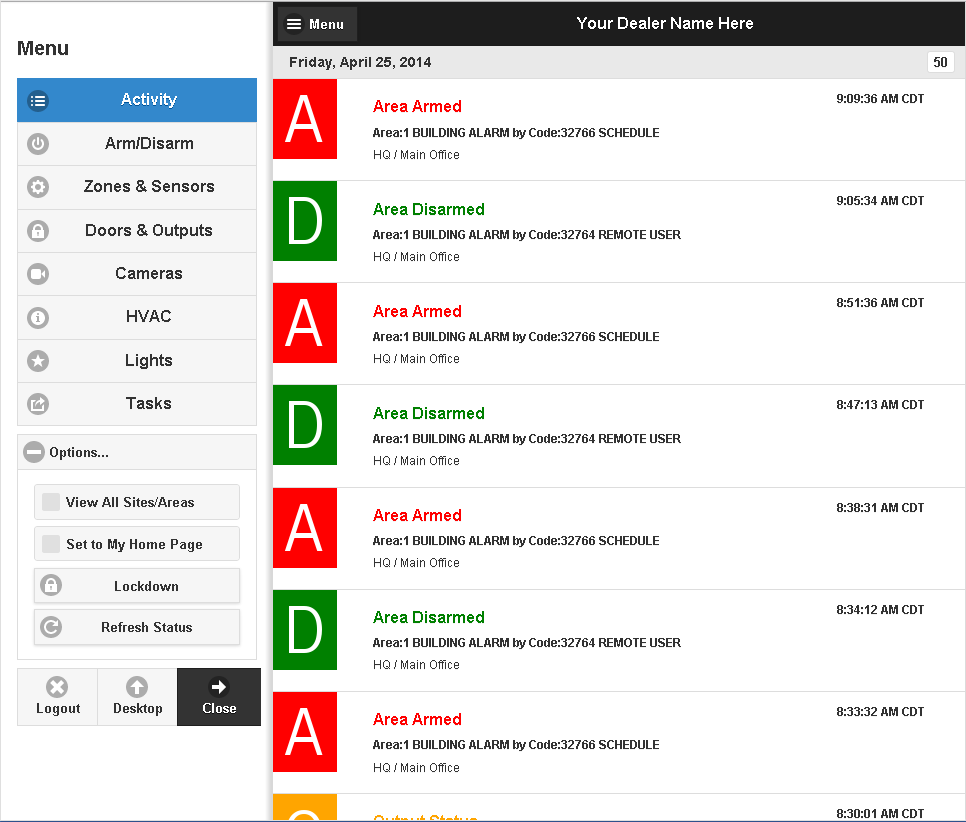
June 24, 2014
iPhone/iPad App - Now Available in the iTunes Store
The App supports all of the mobile features and is now available for download from the iTunes Store. This will provide a easier path for the customer to use the app without needing to store the bookmark icon to their homescreen. View in iTunes Store
Read More
June 6, 2014
Custom Fields & New Reporting Layout
Custom Fields available for storing User Information! Now your customer can individually name and store up to five custom fields of information about a user. Each field may be set to be searchable or hidden. If set to searchable then the contents will be shown in the user list and will allow for sorting and searching of the information. New Reporting Layout! Now a single screen shows predefined reports and your customer's custom reports.
Read More
June 2, 2014
Faulted Zones are now displayed alongside the Arming Status
Now faulted zones are shown when the area is disarmed, hovering or tapping will show a list of zones faulted.
Read MoreMay 23, 2014
New Arming Modes Supported & Desktop/Mobile Updated
Updates for Arming Mode Selections! DMP Panels - All/Perimeter & Home/Sleep/Away Arming Modes are Now Supported including the default Area Arming Mode. A new option has been added to the dealer site allowing you to set the arming mode of the panel. If you change the mode from the default area mode, the customer will see their entire system with the correct arming modes available. The arming mode option is configurable on the device general page under options on the dealer site. ELK Panels - Show/Hide Arming Options Now Supported. A new option has been ...
Read More
April 29, 2014
Android App Now Available & Mobile Updated
Android App - Now Available in the Play Store! The App supports all of the mobile features and is now available for download from the Google Play Store. This will provide a easier path for the customer to use the app without needing to store the bookmark icon to their homescreen. Updated Mobile Application for all Devices! The Mobile Application for all devices has been updated: Improved Look & Feel Improved Performance Faster & Better Quality when Viewing Video "Set to My Home Page" button added - i.e. default to the Arm/Disarm page.
Read MoreApril 7, 2014
Updated Code Deactivation Plus More
Updated Code Deactivation on DMP XR Panels! When a code is deactivated instead of being deleted from the control panel, the code information remains with the profile number set to zero. Now when the user attempts to use their code, card, keyfob, etc. the control panel will be able to match it to the user and it will report Access Denied: Unauthorized, Invalid Profile with the user's name to Connect ONE. This will allow the customer to see if a deactivated user attempts to access the building. Previously the control panel would report an Access Denied: Unknown Code without ...
Read More
March 6, 2014
New Temporary Schedule Option
A new option is added to any Time, Area, Door, or Output Schedule which allows it to become temporary and therefore it will automatically be removed after the time specified. This is great when the customer requires a door to be unlocked at certain times each day but only for the next week. Previously that schedule would need to be removed manually, whereas now Connect ONE will automatically remove the schedule.
Read MoreShowing 205-216 of 230 features