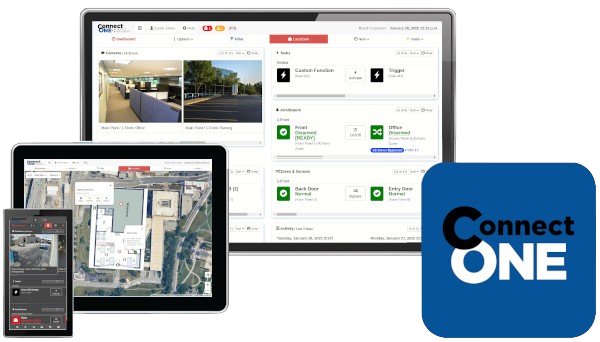

THE CONNECTED CLOUD News & Feature Updates
|
|
|
|
|
| |
Going to ISC West, Let's Meet
Thank you for being a valued Connect ONE Dealer and for your continued support. Will you be attending ISC West this year? If so, we'd be glad to connect briefly in person or schedule a quick call in advance.

|
|
| |
Did you Know? The Connect ONE Experience -- Tailored for Each Customer
Connect ONE includes powerful advanced capabilities, but not every customer needs every feature. That’s why Connect ONE makes it easy to tailor the experience for each customer.
By simply disabling features in a user’s profile, those functions are completely removed from the application interface—whether accessed through a browser or the mobile app.
The result is the best of all worlds: ONE unified application, perfectly tailored for every customer.

|
|
| |
Did you Know? Manage Users Faster with System Profile Templates
Save time by creating pre-set templates for common access profiles. Simply group specific doors or alarm areas together and enroll users with a single click.
For example, a template like “All Perimeter & Offices — South District” allows administrators to onboard new employees in seconds—eliminating the need to configure each location individually.
Templates simplify ongoing management as well. When permissions are updated in a template, the changes automatically apply to all users assigned to it—allowing administrators to make mass updates instantly.
Templates also support better role separation. Administrators define and manage permission templates, while HR personnel can add or remove users without the ability to change individual access permissions.
The result is faster onboarding, simplified user management, and stronger control over system permissions.

|
|
| |
Recent Usability Improvements
Customer Management Portal
- Task Rule (New Actions): You can now specify Activate and Deactivate actions for System Profiles and System Schedules. This allows custom permission settings to automatically change when a scheduled activation or deactivation occurs.

- Safe Passage Template Options Expanded: Safe Passage templates now support embedded links, allowing administrators to include resources such as training videos. A verification question can also be included to confirm the user has reviewed the material. Additionally, True/False response options are now supported.
- DMP Access Profiles: Output Groups have been added to the list of Access Triggers available for a door within a DMP Access Profile. Access Profiles are available when using the Connect ONE Access Expander connected to a DMP panel, which also supports up to 90,000 additional users. Output Groups can also be used for elevator floor call buttons, and they are selectable by door/reader, allowing support for environments with multiple elevators.
Dealer Administrative Portal & System Updates
- 2N Connectivity via My2N Cloud: We've recently improved 2N device connectivity within Connect ONE. You can now establish connectivity to 2N devices using the My2N cloud rather than relying on inbound port forwarding. This is accomplished through a My2N service called Remote API Access (RAA), which allows Connect ONE to communicate securely through the My2N cloud. We hope this enhancement makes 2N integrations easier to deploy and manage while eliminating the need for inbound firewall rules.

- TIP: Check the Configuration page for the Device as it includes recommended programming for the particular product and firmware version.
|
|
| |
WORKS WITH ANY ACCESS SYSTEM! -> NFC Wallet Cards - Native Apple/Google Wallet App
The Connect ONE Wallet Card Solution enables your access card on your mobile device. Now, you can use your Apple Wallet & Google Wallet to gain access to your doors, just like you use your mobile Wallet for everyday transactions. Users will now be able to forget the hassle of physical badges and simply hold their Phone to a Wavelynx reader to gain access. There are no apps, no need to unlock the device, and will continue to work for a period of time if the phone battery is low.
Works with Any Access System | Connect ONE may be used for provisioning management of the wallet card and simply transfer the associated card number into any access system of your choice!
NFC Wallet Cards
✅ No 3rd Party App for Provisioning - Users receive an Email/Text with a Link to Add the Card directly into their Wallet
✅ Works with Wavelynx Ethos Multi-Technology Readers (NFC/Mifare/Prox) ET10-7WS, ET20-7WS, and ET25-7WS
✅ All Cards are Managed via the Connect ONE Platform when Creating the Access Card in the System
✅ Wallet Cards are Branded with Your Company Logo


Learn More
|
|
| |
Give Us the Challenge...
We love hearing from our Dealers with requests from their customers to help solve challenges.
Please contact us and give us the challenge, we may be able to design something for you, and together we can watch your company reach the potential you always knew was possible.
Send us your feedback
|
|
| |
Keep Your Clients Informed: Content for Your Newsletters
Ready-to-use content featuring updates, enhancements, and helpful resources makes it easy to include directly in your client communications.
- Unified Intelligence™ in a single dashboard – delivered through a powerful cloud platform for real-time, total security awareness
- Streamlined User Management – Add or remove users across multiple locations instantly
- Real-Time Activity Monitoring – Generate reports across one or more locations quickly
- Cloud-Based Reliability – No downtime or data loss from hardware failures
- Cross-Platform Compatibility – Works on all major operating systems and web browsers
- Mobile Convenience – Available via Apple and Google app stores for easy access anywhere
- Integrates – intrusion, access, fire, analytics and environmental devices for smarter, faster, reliable system insights and response
- Additions and Changes – Connect ONE allows for system changes and additions easily as needs change
- Trusted – by thousands of nationwide clients protecting financial, education, manufacturing, medical and multi-family

|
|
| |
Stay Up-to-Date
We will continue to include the enhancements in this newsletter as well as the "Feature Blog" on our website, past newsletters may be viewed from "News Articles" on our website.
Also, be sure to review the Home tab on the Connect ONE Dealer App as this will contain many helpful Sales Sheets and Technical Guides.
We encourage you to visit these sites to stay up-to-date.
|
|
| |
|
Working hard to Simplify all your System Integrations,
The Staff at Connected Technologies.
For more information regarding Connected Technologies™ or Connect ONE®, please visit www.SimplifywithConnectONE.com or call (866) 976-3520.
Connected Technologies, LLC., Monument, CO 80132-1266
|
|
|