

Feature Blog
230+ Feature Updates
December 7, 2016
New Reporting Options
A new report detailing system codes that are expiring soon or have already expired can now be generated. A new option has been added to the report filters to select users by profile. This provides a method to easily select a group of users rather than each user individually. Also it allows for simpler interaction event rule management, since if a profile is selected as the filter, the rule will automatically include a new user in the profile. Previously the report filter would have to be updated so that the new user is reflected in the rule.
Read More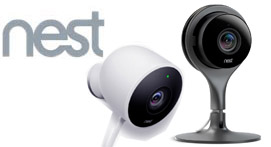
December 1, 2016
Nest Cameras Now Supported
We are excited to announce support for Nest indoor and outdoor cameras. Now you can install Nest cameras for your customer and they may be viewable within Connect ONE. This includes the ability to view multiple locations on the same screen. Support also includes capturing snapshots via Video Verification rules. Video Verification can occur for any event including but not limited to alarm and access events. The Nest Cameras also provide Live Audio within Connect ONE, on-demand and while live viewing a video verification event.
Read More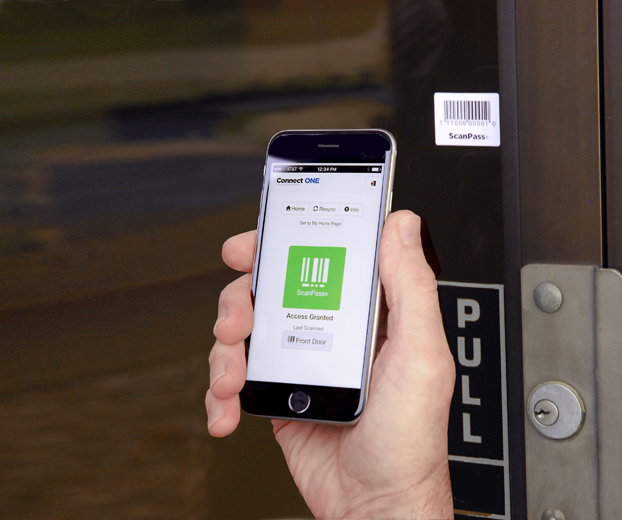
November 10, 2016
Honeywell Vista Turbo Control Panels Support Connect ONE® and ScanPass® Mobile Credentials
Dealers installing VISTA Series panels can now add state-of- the-art access control Now, security dealers can easily add the latest access control feature ScanPass® Mobile Credential to their customer’s Honeywell VISTA installations. Powered by Connect ONE, ScanPass Mobile Credential is a high-security access control application never before available with the Honeywell line. The VISTA-128BPT and VISTA-250BPT control panels interface with ScanPass Mobile Credential through Honeywell’s V-PLEX polling loop technology or 4204 Relay Modules, opening up new access control specification possibilities for installers and their customers.Through the Connect ONE Web-Hosted interface, Honeywell ...
Read MoreNovember 7, 2016
Interaction Event Rules
A security dealer of a multi-location bank institution asked us for the ability to temporarily bypass their notification rules when they perform system testing. This feature was already available from the dealer site but was not available to the customer without deactivating each rule then having to remember to reactivate after testing. Now the customer can bypass any rule for 2 hours, after 2 hours the rule will automatically become active once again, otherwise they may choose to reactivate manually prior to the bypass period ending. As always we were happy to accommodate their request and now all of ...
Read More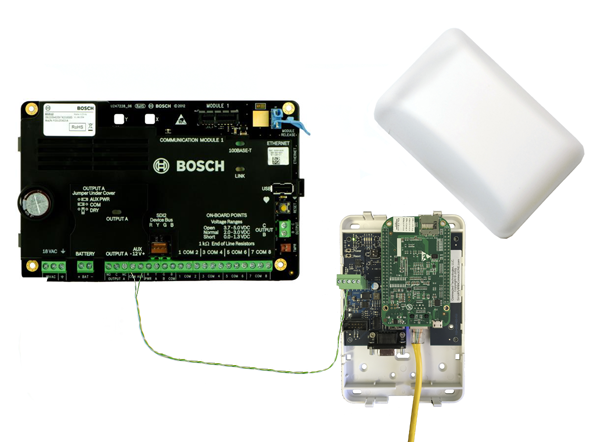
October 10, 2016
Bosch B/G Control Panels Now Support ScanPass® Mobile Credential
ScanPass Mobile Credential is the next generation in simplifying access control integrations.No longer is it necessary to purchase or install readers, cards or fobs, reducing system costs for both dealers and their customers. Installation is as easy as putting a barcode sticker on the door. A smartphone reads the barcode to identify the door and a unique credential in the phone is used to identify the individual. ScanPass is managed the same as a card or fob. It's that simple! Compatible with: NEW! Bosch B/G Series (B3512, B4512, B5512, B6512, B8512G, B9512G) ELK M1 ...
Read MoreOctober 7, 2016
Monthly Automated Reports Added
A security dealer of a multi-location bank institution asked us for monthly open/close reports rather than the current daily or weekly options. The bank's financial auditors required a monthly log and therefore the bank manager requested to receive a monthly report rather than piece together multiple weekly reports. As always we were happy to accommodate their request and now all of your customers on the PRO service level have an option for Daily, Weekly, and/or Monthly automated reports.
Read MoreSeptember 1, 2016
Bosch Remote Connect Cloud Support
Bosch's Remote Connect service offers connectivity for Connect ONE and RPS without port forwarding and it universally allows for ethernet and/or cellular connection options. Network connections are provided with the onboard ethernet port and cellular connections are provided using the Bosch cellular radio add-on module. Router and firewall configuring is no longer necessary when using the Remote Connect service.
Read MoreAugust 15, 2016
Bosch B6512 Control Panel Support
Connect ONE now supports the latest Bosch B series control panel, the B6512, which: Provides up to 96 points using a combination of hardwired or wireless devices for installation flexibility and up to 6 areas with perimeter and interior control On-board Ethernet port for Conettix IP alarm communication and remote programming, compatible with modern IP networks including IPv6/IPv4, Auto-IP, and Universal Plug and Play Provides up to 4 access doors
Read More
July 15, 2016
Email New User Login Instructions
A new time saving feature has been added which can automatically generate an email, to a created user login, all of the necessary instructions to login to the Connect ONE application. It will also randomly generate a password that the user can change when they login. The random password ensures strong security. The login instruction email may be generated from the Customer Site or the Dealer Site, allowing the dealer a quick and convenient method to emailing a new customer their login information and instructions. Another recent feature added was a password strength meter. This ...
Read More
June 7, 2016
See who last Armed/Disarmed from the Arm/Disarm Menu
Now you can see who last armed or disarmed right from the Arm/Disarm menu where you can also change the arm status. This allows a quick reference to see who last armed or disarmed along with the time/date and the user's phone number to contact if needed.
Read MoreJune 7, 2016
Low/High Temperature/Humidity Alarm Thresholds Configurable by Your Customer
Now your customer can configure low/high alarm threshold levels for temperature and humidity sensors on their own. On the Utilities menu they can select Zones & Sensors and rename each sensor as well as set/adjust the low and high threshold level. Any change will be logged with the old and new value as an event. This will prevent any possible contention of who made the change. Previously this was a feature reserved for the dealer on the Dealer Site, now the dealer does not need to be involved with the decision of threshold level.
Read MoreMay 19, 2016
Output Group Management
Now you can add/modify/delete output groups on DMP XR panels right from the Dealer Site. Previously this task had to be performed in RemoteLink. Output groups are mainly used for Elevator Control with DMP panels. Now you can regroup floors quickly and effortlessly. For even better elevator control, view the Connect ONE Access Expander, which can handle multiple cabs and floors seamlessly in a user's profile.
Read MoreShowing 169-180 of 230 features