


Feature Blog
230+ Feature Updates

May 9, 2016
Code/Card Activation Date
Creating a new code/card in advance has never been easier since now you can set an activation date on a system code/card. This effectively allows you to have a user's information added ahead of their arrival without granting them permission to soon before its necessary. The Activation Date feature is available on all system control panels including ELK, Bosch, and DMP. ELK M1 systems with the Connect ONE Access Expander and DMP XR systems also have the benefit of including an Expiration Date. On those systems you can specify an automatic ...
Read More
April 13, 2016
Bosch Skeds Support
Bosch Skeds are now supported in the B8512G and B9512G control panels. Customers can now edit existing skeds programmed in the control panel to modify the time/date, days of the week, and holiday execution of the schedule. Skeds appear on the Schedules tab of the Customer Site.
Read MoreApril 4, 2016
3rd Party Integration with Open UserAPI
The Connect ONE Access Expander just became even more powerful. It now supports the open UserAPI for 3rd party interfaces to add, modify, deactivate, and delete Users and System Codes. This is the perfect solution for Storage Facilities, Fitness Centers, or any other facility which has memberships. A new member can be assigned access without having to re-enter their information into Connect ONE - saving on double entries. Likewise when their membership has expired their access can automatically deactivate without any human intervention. Another great solution is integration with time & attendance or other HR programs to ...
Read More
March 14, 2016
User In/Out & Exception Activity Dashboards Plus More
We've recently added new features that greatly enhance the customer experience: A User In/Out Activity Dashboard has been added. Available on any Monitor page, Options->View User In/Out. This will automatically update with user in/out activity for the last 24 hours in near real-time. This dashboard may be kept open to watch where people currently are within the customer's facilities. An Exception Activity Dashboard has been added. Available on any Monitor page, Options->View Exceptions. This will automatically update with door/output & zone exception activity in near real-time. &...
Read More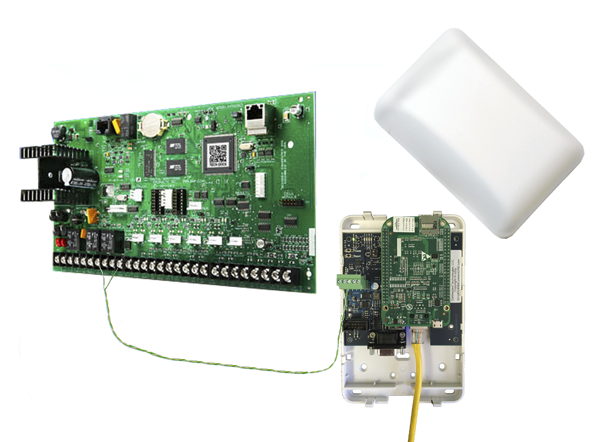
February 22, 2016
DMP XR Control Panels Now Support ScanPass® Mobile Credential
ScanPass Mobile Credential is the next generation in simplifying access control integrations.No longer is it necessary to purchase or install readers, cards or fobs, reducing system costs for both dealers and their customers. Installation is as easy as putting a barcode sticker on the door. A smartphone reads the barcode to identify the door and a unique credential in the phone is used to identify the individual. ScanPass is managed the same as a card or fob. It's that simple! Compatible with: NEW! DMP XR150, XR350, and XR550 Control Panels ELK M1 Gold and EZ8 Control Panels &...
Read MoreJanuary 22, 2016
DMP XR550 with 96 Access Door Capacity Now Supported
DMP recently announced version 111 firmware for the XR550 control panel which expands its access control capability from 16 doors to 96 doors. Connect ONE fully supports the additional door capacity. A XR550 panel is now 32 door capable out of the box with two additional 32 door feature codes which can be ordered separately. This will accommodate larger systems without the necessity to stack control panels.
Read MoreJanuary 7, 2016
ScanPass Mobile Credential
Unlock Doors Fast Using Smartphone or Tablet Introducing ScanPass powered by Connect ONE. Now you can provide Cutting Edge Technology and Value to your clients while generating significant additional Monthly Recurring Revenue. Easily affixed barcode stickers eliminate access control cards/fobs and readers. Complete jobs faster, more profitable and secure! Learn More
Read MoreJanuary 5, 2016
Mobile App Gets All Management Functions
The mobile App for Apple and Android devices now supports all management functions New functions include: Reporting (Event Detail, In/Out, Exit Exception, Historical Temperature/Humidity & Custom) Interaction (Event Rules, Time Rules, Task Rules) Users & System Codes Profiles (Login & System) Schedules Utilities Previously the App was capable of the controlling functions provided in the Monitor section. The App was deigned for seamless operation since the look & feel is identical to the Browser version and a common Login Profile restricts the App and Browser permissions alike.
Read MoreJanuary 4, 2016
Improved Usability Features
Ease of Permissions The Admin Login Profile now grants full permissions to the user for all systems regardless of the user's codes. Previously, the user would need a code with the necessary permission to manage the system. This is still true for any user that doesn't belong to the Admin profile group. The Login to Customer Site option on the Dealer Site has been revamped. Previously you had two options: 1) Login to the Customer Site as your dealer user with full permissions, or 2) Login to the Customer Site as a customer user with read-only permissions. The latter option has ...
Read MoreNovember 1, 2015
Announcing the Connect ONE Access Expander
The Access Expander is on the shelf and ready to ship.Plug-in & Go – Instant Always-On Communication(No Network/Router Configuration Required/No Port Forwarding)16 Access Doors – Expandable by Stacking Control Panels10,000 Users (Keypad Codes and/or 26-bit Access Cards)1000 Profiles (Arming & Access Permissions with Scheduling)250 Time Schedules50 Holidays (can be set to a date range, i.e. one holiday can span multiple days)Door & Output Schedules (up to 8 Time Schedules applied per output)Elevator Control2500 count event buffer – storing of events if the ...
Read MoreOctober 14, 2015
Critical Humidity Monitoring & Historical Logging
Humidity sensing joins temperature in the list of monitored conditions of Connect ONE’s alerting and historical reporting functions. Now your customer can view the real-time relative humidity level of a room as well as receive alerts if the pre-defined low or high thresholds are reached. Also, the humidity level can be logged for historical reporting. The logging intervals are the same as temperature sensors, which are: 1, 2, 4, or 6 times per day, or bi-hourly, hourly, or semi-hourly. The Network Gateway module is required to monitor humidity. It will accept up to one combination temperature/...
Read More
October 13, 2015
Customer Zone Name Changes
A new page has been added to the customer site which allows an Administrator to edit the names of the zones in the panel. Name changes from this page do not alter the names within the control panel. The change is made for the customer site only and the dealer site will retain both names, the customer chosen name as well as the panel name. This new page is located in the Utilities section of the customer site. This new feature gives your customer the flexibility to customize their system without requiring dealer intervention.
Read MoreShowing 181-192 of 230 features